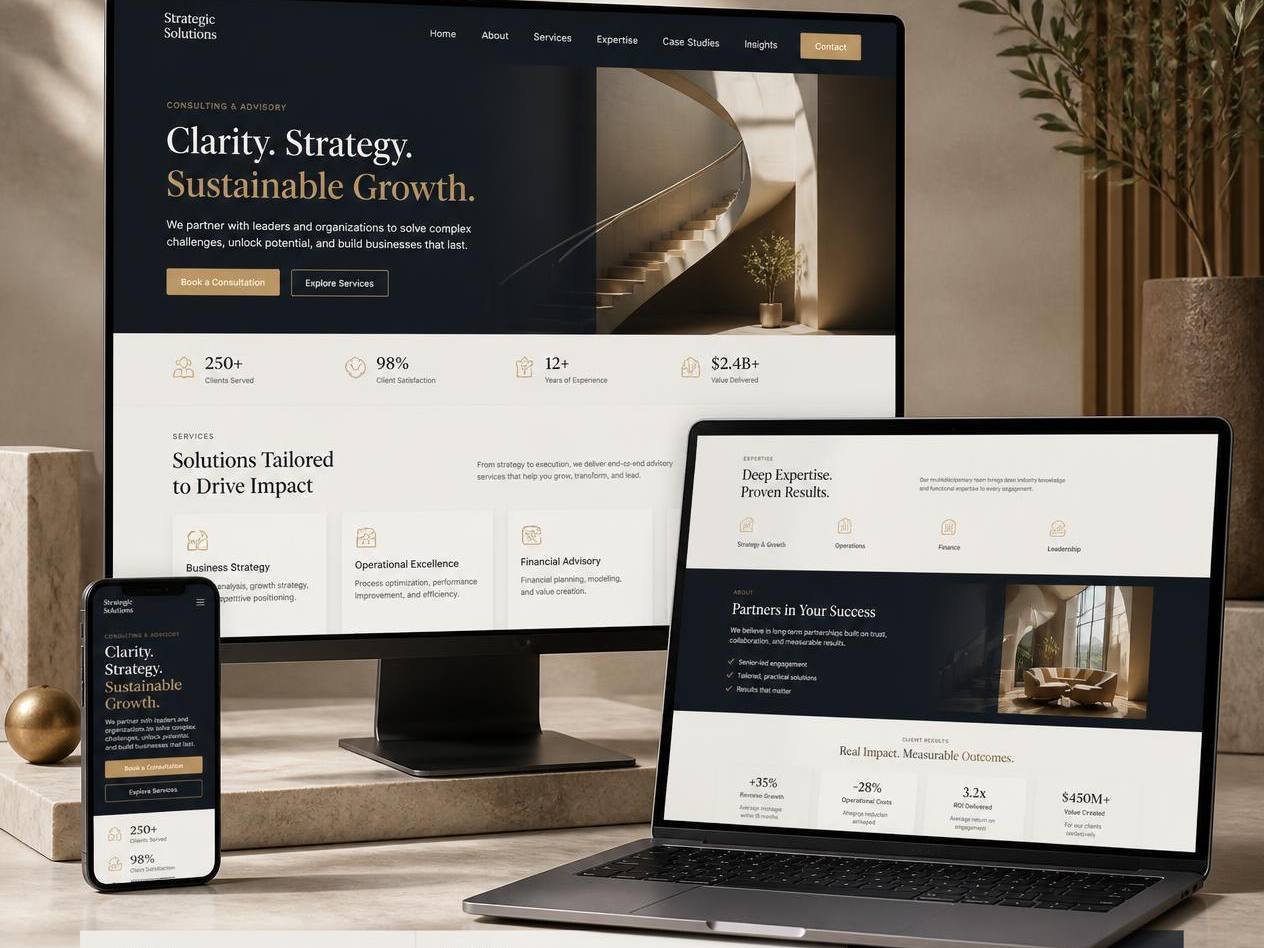
Screenshots of the actual template. Every page, component and state shown is included in the download.
Harbor — Consulting Business Website Template
Credibility-first pages for advisors who sell expertise, outcomes and a clear next step.
- Category
- Business & Consulting
- Pages included
- 10 pages
- File format
- ZIP · HTML, CSS, JS
- Delivery
- Instant download
- Licence
- One end product
- Support
- 6 months included
- Updates
- Free, for life
- Last updated
- February 2026
- Secure payment via Stripe or PayPal
- Download link valid for 72 hours, re-issued free
- No account required, no subscription
Overview
Harbor is designed around the way consulting work is actually bought: a prospect arrives via referral, checks whether you understand their problem, looks for proof, and then wants an easy way to book a conversation.
The template gives each of those moments a home — sharp service pages, a results section with real numbers, sector-specific landing pages, and a discovery-call booking block that can point at Cal.com, Calendly or a plain form.
What's included
- 10 pages including three sector landing-page variants
- Results and outcomes section with animated counters
- Booking block ready for Cal.com, Calendly or a custom form
- Insight / whitepaper layout with gated-download markup
- Team and credentials components
- Editable colour, type and spacing tokens
Pages and sections included
10 ready-made pages:
- Home
- Services overview
- Service detail
- Sector landing page
- Results & case notes
- About & credentials
- Team
- Insights index
- Insight article
- Book a call
Built from these sections and components:
- Problem-framing hero
- Credential strip
- Service cards with outcomes
- Engagement model timeline
- Results with animated figures
- Client quotes with attribution
- Insight download block
- Discovery-call booking band
- Contact with response-time promise
Key features
Sector landing pages
Duplicate one file per industry so cold outreach lands on a page that speaks the reader's language.
Engagement timeline
A four-stage 'how we work together' component that removes the mystery from your process.
Animated result figures
Counters that run once when scrolled into view, with reduced-motion respected.
Gated insight downloads
Markup and validation for exchanging a whitepaper for an email address.
Booking-tool agnostic
One commented block to paste your Cal.com or Calendly embed, or fall back to the built-in form.
Printable one-pager
A print stylesheet turns your services page into a leave-behind PDF.
Responsive and mobile design
Harbor is built mobile-first and tested at 320, 375, 414, 768, 1024, 1440 and 1920 pixels before release. Small screens are not an afterthought — navigation, tables, galleries and the 10-page structure are each redesigned for the space available rather than shrunk to fit.
- Fluid type and spacing scales, so headlines stay in proportion between a phone and a 27-inch display.
- Tap targets of at least 44×44 pixels on every control, with visible focus rings for keyboard users.
- Images served at sensible dimensions with lazy loading below the fold and reserved space to prevent layout shift.
- Tested in current Chrome, Safari, Firefox and Edge, on iOS and Android, and with reduced-motion preferences respected.
Customisation and editing
Everything you will want to change is in an obvious place. Colours, fonts, radii and spacing are CSS custom properties declared in one block at the top of the stylesheet — change those six or so lines and all 10 pages follow. Text and links are edited directly in the HTML, with comments marking each section.
- No build step, no Node, no package manager — open the folder in any editor and double-click a page to preview it.
- Swap images by dropping your own files into /assets/img using the same filenames, or point the markup anywhere you like.
- Every component is commented and reusable, so adding a page means copying a block rather than writing CSS from scratch.
- Clean, semantic markup that ports cleanly into WordPress, Webflow, Astro, Eleventy or a React project when you outgrow static files.
Ideal for
- Independent consultants and fractional executives
- Boutique strategy, finance and operations firms
- B2B service providers with a referral-led pipeline
- Coaches selling structured engagements rather than hourly calls
Frequently asked questions
Yes. The booking section contains a clearly marked embed slot. Paste the snippet from Cal.com, Calendly, SavvyCal or HubSpot Meetings and it inherits the template's styling.
Delete the two insight files and remove the nav link — the rest of the site has no dependency on them. The setup guide walks through it.
Basic comfort with HTML and CSS is enough. Text, images and links are edited directly in the HTML, and colours and fonts live in a short list of variables at the top of the stylesheet. If you can edit a text file, you can launch one of these.
One licence covers one end product — your own website, or one client project. You can modify the template as much as you like. You cannot resell, redistribute, sublicense or share the template files themselves.
Anywhere that serves static files: Netlify, Vercel, Cloudflare Pages, GitHub Pages, or classic shared hosting via FTP. Most are free for a site this size, and the guide covers each.
Because templates are delivered instantly and cannot be returned, all sales are final once the download link is issued. If a file is corrupt or a page does not match its preview, contact us within 14 days and we will fix it or refund you in full.
You might also like